POS Staff App
A lightweight web app for the counter — scan, recognize, reward. Works in any tablet or phone browser; nothing to install. Requires an active connection.
What it does
Staff scan a customer's wallet pass QR at the register and instantly see what they're holding and who they are. The card is state-aware — a VALID, PASS USED or EXPIRED banner up top — and shows the same offer title, details and terms the customer sees on their pass face, always current even if you edited the pass after it was issued. An event ticket that was scanned before shows VALID, PREVIOUSLY SCANNED with a warning icon (a valid one shows a check mark) and the list of its past scans, each with its venue (the register that scanned it) and its date and time. While the scanner clearly indicates that the ticket has already been presented, it also confirms whether it is a valid ticket, which allows for more flexibility and control at the gate: the person at the gate decides, and tapping Check in records the re-entry with its time and register. One tap awards points, redeems a coupon, or checks in a ticket. No hardware, no POS replacement, no per-seat licenses.
Setup
- In Settings → Registers, create a register for each device or location ("Front counter", "Downtown store"), optionally with a PIN.
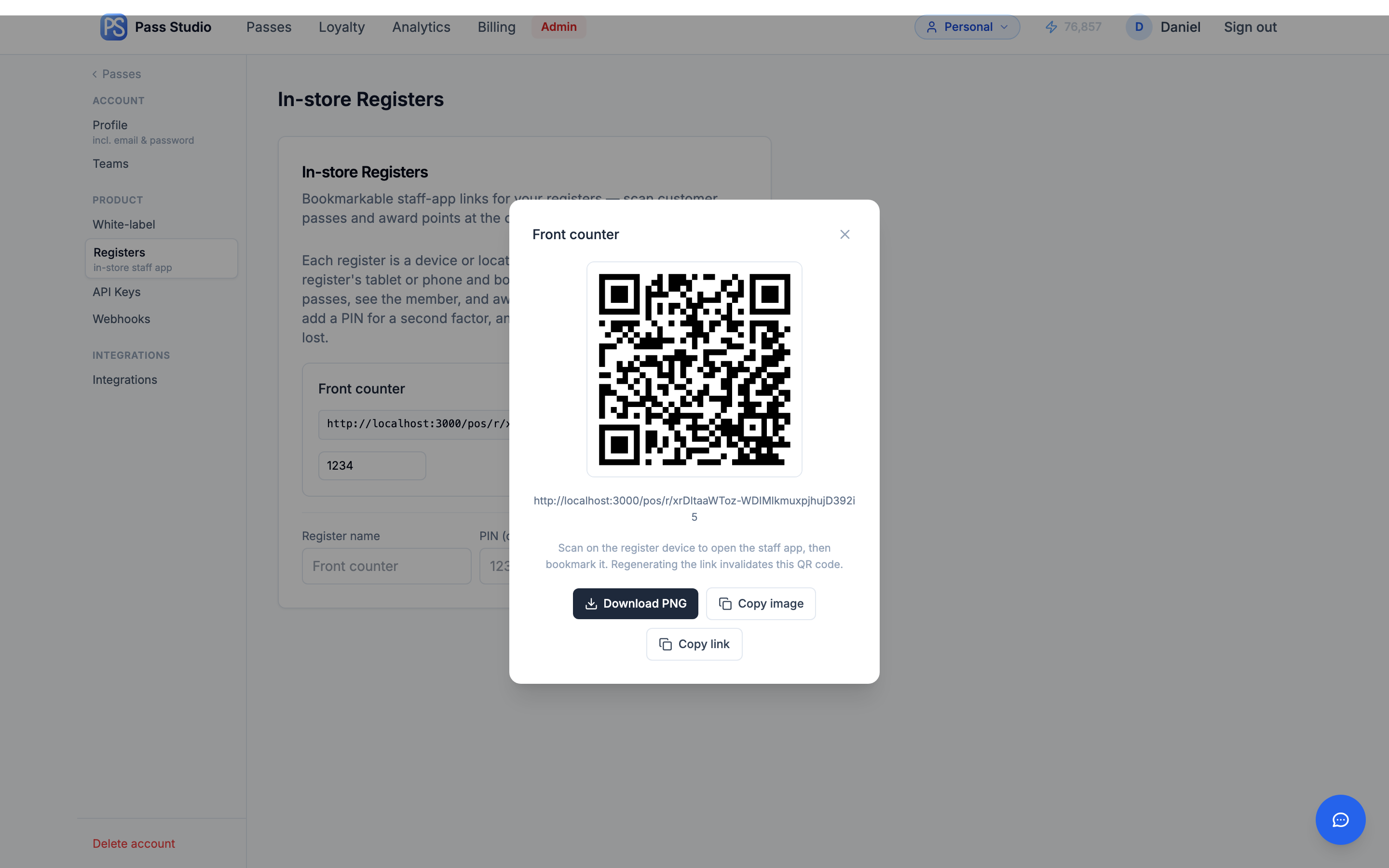
- Open the register's link on the counter device — click the QR button next to the link and scan it with the device's camera, or copy the link and send it by SMS or email. The QR popup also lets you download or share the code as a PNG. Bookmark the page or add it to the home screen.
- The link itself is the key — regenerate it if a device is lost. With a PIN set, staff sign in once; the session stays valid for 12 hours.
At the counter
- Point the camera at the customer's pass QR (Apple Wallet or Google Wallet — both work).
- The member card opens: validity banner, member identity, and the pass itself — offer title, details and terms for coupons; points balance and tier for loyalty passes.
- Loyalty: enter points and confirm — the customer's pass updates instantly with a push. Coupons: tap Redeem to mark the pass used (any Shopify discount code behind it is voided automatically). Event tickets: tap Check in to record the entry. A ticket checked in again within the hour is not charged.
Camera Scan — no staff app needed
For membership cards, you can skip registers entirely and let any phone camera validate a card. Turn on Camera Scan in the Studio → Fields tab → Barcode section (QR barcodes only). Every member's card then carries a QR that a normal phone camera opens — useful for partner venues, door staff, or anyone who shouldn't have your register link.
- PINs, not links. In Settings → Registers → Camera Scan partners, add one partner per venue. Each gets a generated 6-character PIN. The first time a phone scans a card it asks for the PIN; after that the device stays signed in (Device sign-in (days), default 180, adjustable per partner) and every scan opens the member panel directly — validate, award points, edit details, enroll.
- Revoke a venue in one click. New PIN signs out every device using the old one. Use it when a partnership ends or a phone goes missing.
- Nothing without the PIN. A screenshot of the QR shows nothing about the member. On a revoked card, staff see “This membership is no longer active” with name and Member ID — no reasons or dates.
- Billing is identical to staff-app scans — the same per-register scan windows apply. On top of that, repeat scans of the same member within 60 minutes count as a single visit, and invalid or revoked cards never bill.
- Switching it on upgrades existing cards on your next save-and-push; switching it off reverts them the same way. No re-issuing. Works together with Use Member ID as the barcode value: with both on, the QR opens your scan page and carries the member's own ID inside it.
Billing
Looking a member up is free. Awarding points counts as a redemption scan: 1 credit per scan pay-as-you-go, or — on Growth/Pro — 1 credit per 15-minute window per register per pass design, so a busy counter is billed at most 4 credits an hour however many customers it scans. Billing details →
Tips
- Registers are account-scoped — one register handles every pass in your account, whatever the customer is holding: a coupon, an event ticket, a loyalty pass in any journey state.
- Print the register's QR code (download it as a PNG from the QR popup) and tape it by the till — onboarding a replacement device is one camera scan.
- Regenerating a register's link invalidates old bookmarks and any QR codes you saved earlier.
- Points awarded at the counter run through the same loyalty engine as online orders — reaching a reward threshold transitions the pass and notifies the customer, exactly like an online redemption.
- Prefer your own till system? The REST API exposes the same lookup and points operations.