Live Passes & Journeys
How pass content is updated after issuance: push mechanics and the four notification channels, audience segmentation for campaigns, journey configuration and transition rules, and the dynamic loyalty loop.
Update model
A pass remains editable after holders have added it to their wallets. Saving changes to an active pass offers two options: Save only (holders receive the new content on their next natural refresh) or Save & push (all holders' devices are updated immediately; 1 credit). Delivery differs by platform: Apple Wallet devices receive a silent APNs push and re-fetch the pass; Google Wallet objects are updated server-side in the same operation.
Per-holder values — unique codes, points balances, member fields, per-holder field overrides set via the API — are preserved through template pushes. Template-owned content fields (offer title, details, terms, expiry) always render from the template for every holder.
Notification channels
Four channels put pass content in front of the holder. Three are server-triggered; the fourth is handled by the device itself.
1. Silent push update
Save & push without a message. Content refreshes with no lock-screen alert; the holder sees the new state the next time they open the pass.
Typical uses
- Extend a coupon's expiry date two days before it lapses — holders who open the pass see the new date; nobody is interrupted.
- Correct a wrong price, terms line, or typo on a pass that is already in circulation.
- Swap seasonal artwork or a menu link on a membership card outside business hours.
2. Campaign notification
A campaign sends a message to a selected audience segment: a lock-screen notification and, on iPhone, a "Latest update" row on the back of the pass. It goes out now or at a date and time, and it may have an end, when the message leaves the back of the pass with no notification. On a coupon it can also change pass content in the same send. Content and alert always ship together, so the card a holder opens matches the notification that brought them there.
Typical uses
- Announce a 48-hour promotion with a lock-screen message while writing the promo code and new expiry onto the pass in the same send.
- Schedule "Doors open at 19:00" for the minute the doors open, with an end the next morning so the line leaves the back of the ticket.
3. Journey arrival notification
Configured per pass under Pass journey: "Notify holders when a journey transforms their card into this pass", with an optional message up to 140 characters (a default is used when empty). The setting belongs to the pass being arrived at, not the pass being redeemed, and fires on every transition type — redemption, order-triggered, timer, or self-heal.
Typical uses
- A reward pass announces itself the moment the loyalty threshold is crossed, while the customer is often still in the store.
- A terminal thank-you face confirms the redemption went through, replacing a receipt-style follow-up email.
4. Geofence notification
Up to 10 locations per pass (latitude, longitude, optional lock-screen message). Coordinates are embedded in the pass file; the device OS manages the geofence and surfaces the pass on the lock screen when the holder is within roughly 100–200 m. No server call is involved and no credits are consumed; behavior is native to Apple and Google Wallet and works offline.
Typical uses
- Store locations on a coupon: the pass surfaces when the holder walks past, code ready to scan.
- The venue on an event ticket: the ticket appears on the lock screen on arrival, before the holder reaches the door.
- A multi-branch shop lists its three nearest branches on the loyalty pass.
All server-triggered channels reach only devices with push enabled for the wallet; the Campaigns tab shows the reachable-device count per segment before sending.
Audience segments
The Campaigns tab targets one of nine segments, each computed live with its reachable-device count:
- All holders
- Not yet redeemed — added the pass, never used it
- Already redeemed — at least one redemption
- Recently redeemed — redeemed within the last 7 days
- Highly engaged — 3+ scans or opens
- Going cold — no activity for 30+ days
- New this week — added within the last 7 days
- Apple Wallet users / Google Wallet users
A campaign is built in four steps: select the segment; write the message, one row per language of the pass; optionally update content on a coupon (offer title, promo code — with a random-code generator — expiry date, back-of-pass description) or add bonus points or an offer on a loyalty program's pass; then choose the start and the end, review the summary with audience size and credit cost, and send or schedule. Cost: 2 credits per notified device, on every plan, an offer included, charged at the start on the devices counted then. A scheduled campaign can be canceled until it starts. Campaign history records each campaign's status, segment, device count, credits, promo code, dates, and the change in redemption rate following each send. The same campaign can be sent over the API: POST /api/v1/passes/{passId}/campaigns.
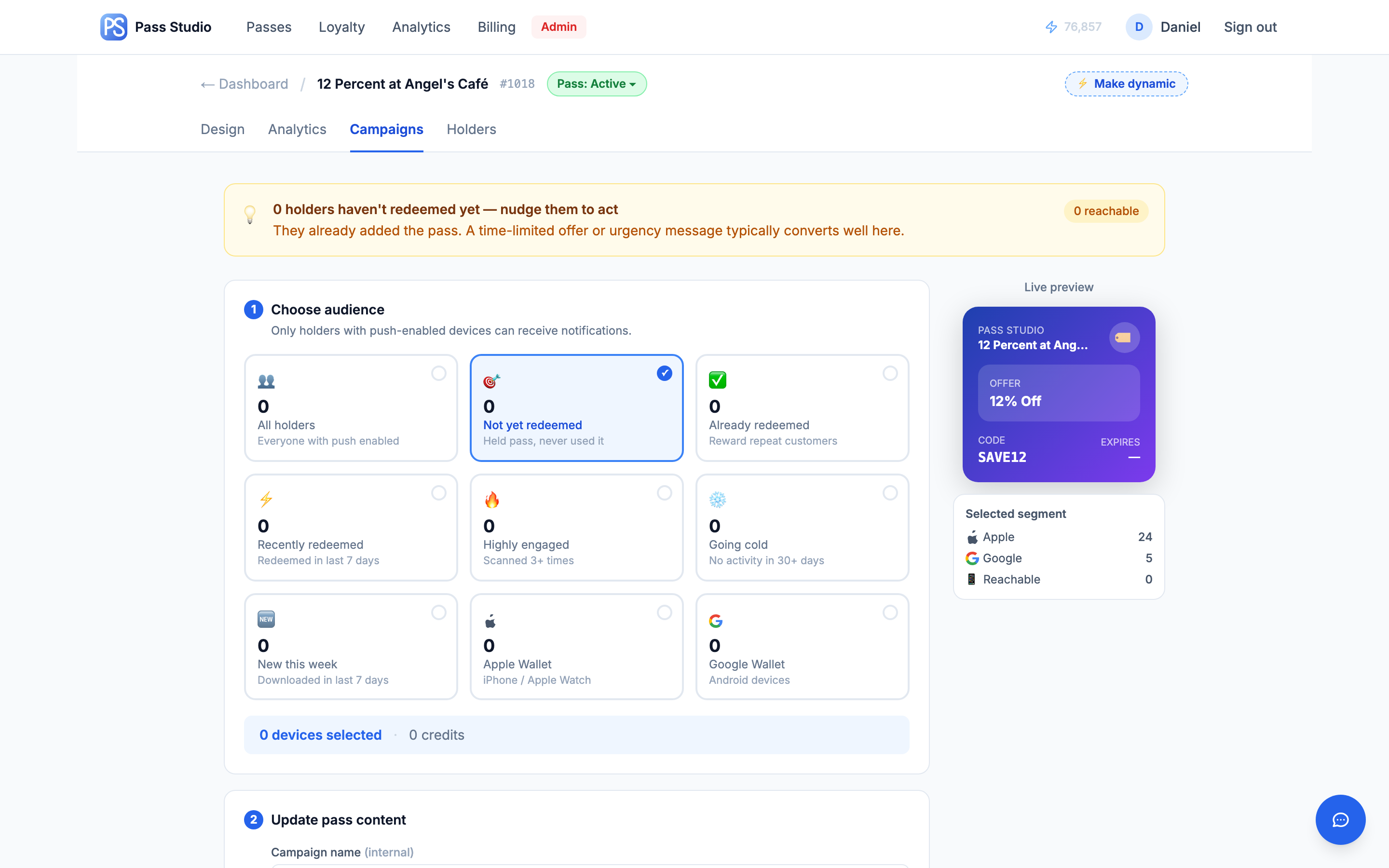
Typical uses
- Not yet redeemed, 10 days after launch: reminder message plus a fresh expiry to re-open the window.
- Going cold: a win-back offer with a generated one-off promo code; the redemption delta in campaign history measures whether it worked.
- New this week: a low-key welcome explaining how to use the pass at the counter — silent, no alert.
Journeys
A journey defines what a pass becomes after it is fully redeemed. Instead of remaining on a used face, the holder's card is replaced in place by a configured follow-up pass; the holder keeps a single wallet card whose content advances through the chain.
Configuration
- Open a unique-code pass and expand Pass journey in the Distribute panel.
- Select the follow-up pass under "After redemption, transform into…". Only active passes are selectable; drafts are grayed out until published. Exception: a pass may point at itself while still a draft, since it activates together with its journey.
- The chain preview renders the full path (Welcome → Thank You → Spring Sale). A later step pointing at an earlier pass forms a loop, marked ↩.
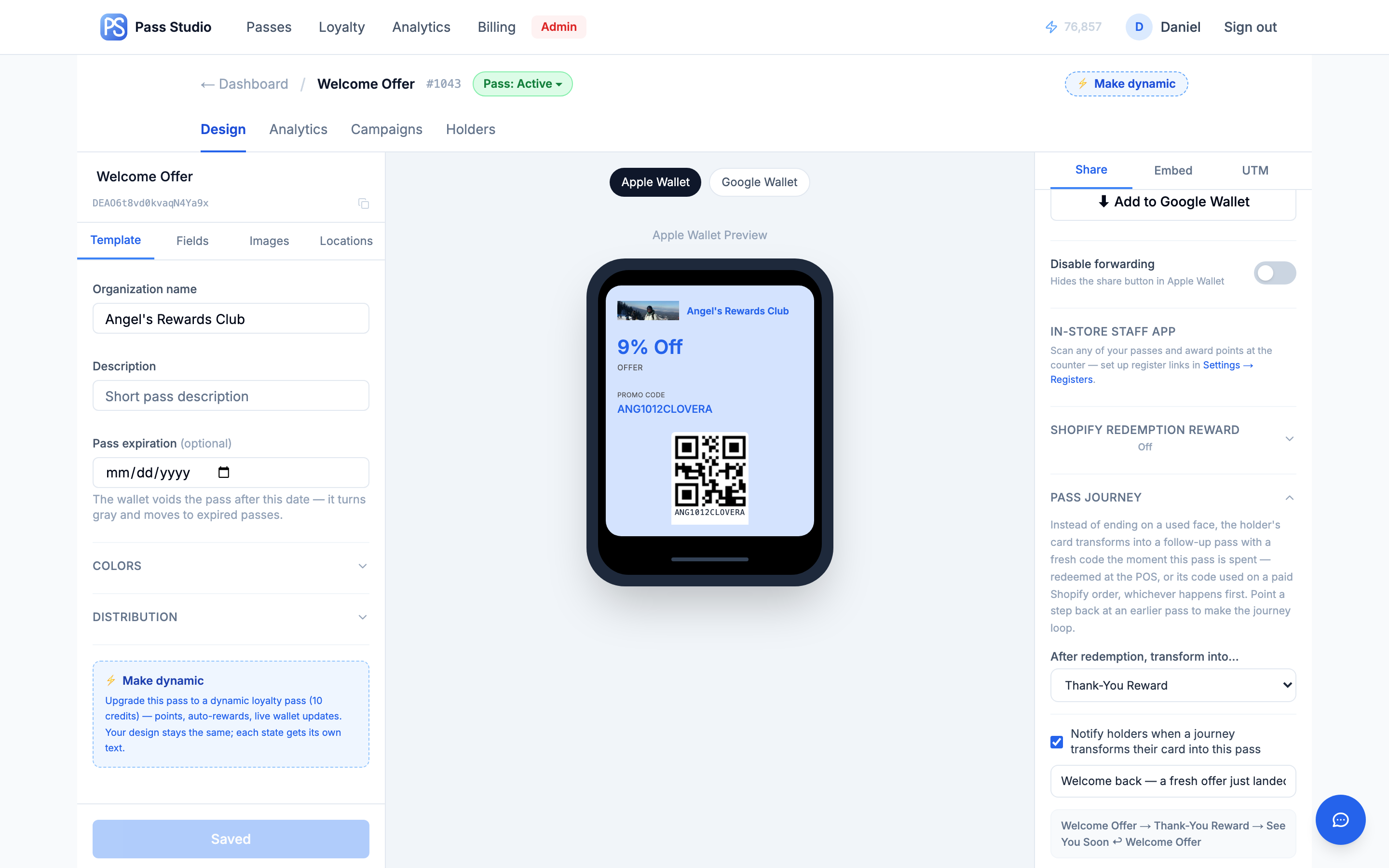
Transition semantics
The transition fires when the pass is fully redeemed — the last remaining use is spent. Any redemption path counts, whichever occurs first: the pass's discount code on a paid Shopify order, a redemption in the POS staff app, or the redemption API. The holder's card switches to the follow-up pass with a new unique code from that pass's own numbering; if the follow-up has Generate Shopify discount codes enabled, a matching one-time Shopify code is created in the same operation. Each transition costs 1 push-update credit.
Typical uses
- Acquisition chain: a welcome coupon distributed via QR transforms into a member card carrying the next offer after first redemption.
- Event follow-up: a ticket becomes a time-limited discount pass at check-in, targeting attendees while the visit is recent.
- Standing promotion: a self-loop reissues the same offer with a fresh one-time code after each redemption.
Park steps
A Simple-mode pass inside a journey is a park step: it has no per-holder code, so the card rests on the designed face and advances on a configured trigger — after N days on the step, on the holder's next Shopify order (matched by order email), or both, whichever comes first. A park step with no follow-up ends the journey on that face. Constraints: only holders who arrived via the journey advance automatically (direct saves of the park pass stay put), and a park step cannot point at itself.
Typical uses
- Cool-down: 30 days on a thank-you face between two discount offers, capping discount frequency per customer.
- Purchase-triggered follow-up: the card waits after redemption and turns into the next offer only when the customer places another order.
Modifying a journey
- Re-pointing a journey affects future redemptions only; holders already transitioned are not moved.
- A pass that is a journey target cannot be archived or deleted while a journey points at it; archiving the pointing pass clears its journey.
- Missed transitions self-heal: if a transition could not run (lost webhook, insufficient credits), it completes on the holder's next Shopify order or during a daily background check once credits are available. Holders who finished a pass before its journey existed are never moved retroactively.
- Dashboard indicators: → journey badge, ↻ for self-loops.
Dynamic loyalty loop
For accounts with a connected Shopify store, an offer pass can be converted into a three-state loyalty program with a built-in loop — journeys are not involved; the cycle is managed by the loyalty engine.
Setup
- Template tab → ⚡ Make dynamic (10 credits, one-time) → rules wizard: welcome offer, earning rate, reward offer and points threshold, code format.
- The editor gains a state switcher (Welcome · Earning · Reward); face text is designed per state, branding and Terms are shared across all three. Content edits reach existing holders on their next update without reissue.
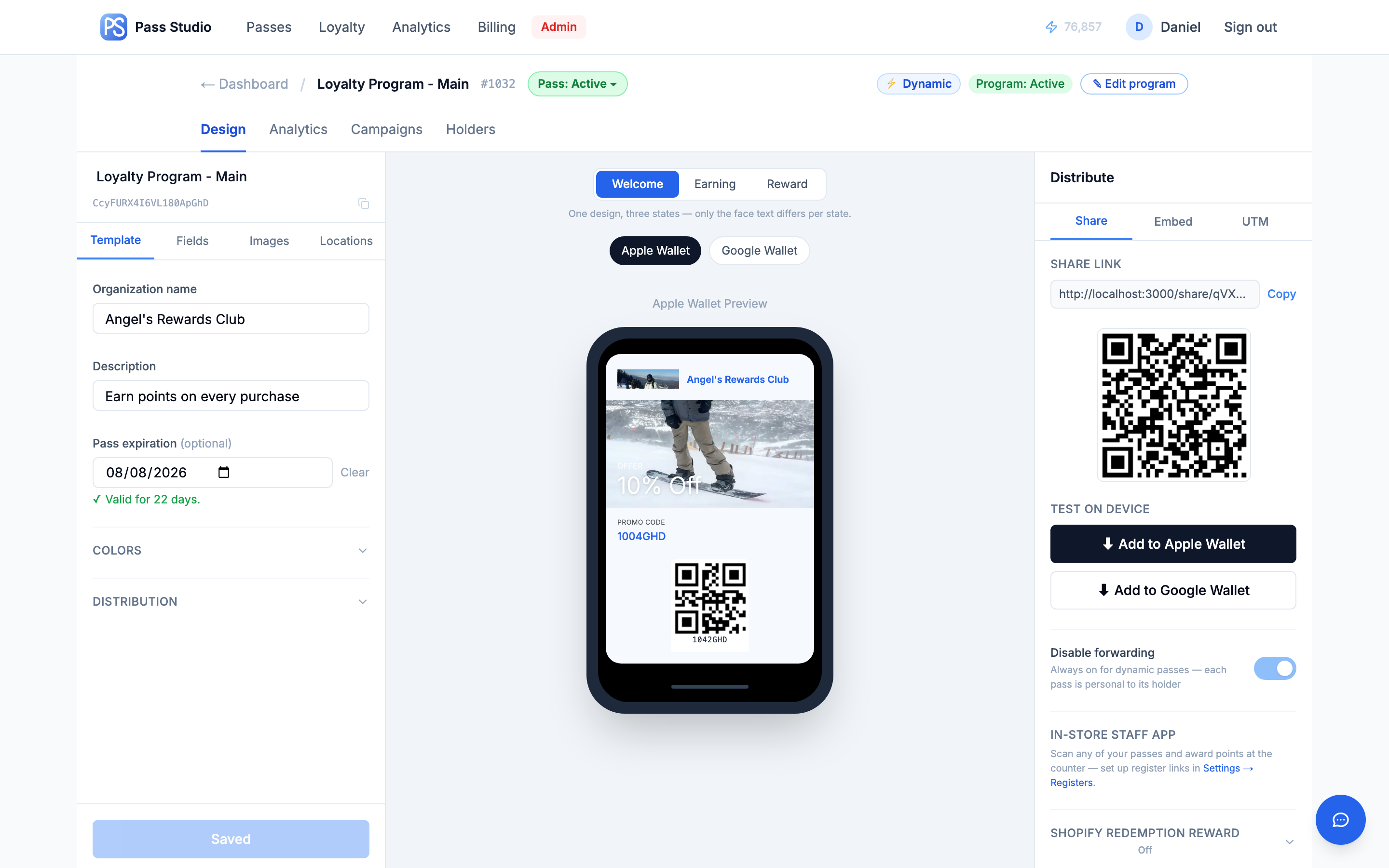
Runtime behavior
- Welcome — the pass carries a one-time Shopify discount code unique to the customer, valid online and at POS.
- Earning — after the welcome redemption the card renders as a points card. Every paid order carrying one of the customer's codes accrues points, including the orders that redeem a welcome or reward offer. The balance is a field on the face and updates after each order.
- Reward — crossing the threshold transforms the card into the reward state with a new one-time code. Redemption deducts the reward cost, carries surplus points forward, and returns the card to earning with a fresh code.
Codes rotate per customer per cycle and are real Shopify discounts. Email-identified customers see their current code as text on every face for typed entry at online checkout. Anonymous in-store customers scan the barcode; they become identified permanently the first time one of their codes appears on an online order. On Android the three states render as a single Google Wallet loyalty card updating in place (Google Wallet does not permit a saved pass to change card type); the front shows points and current offer, with full text, code, details, and terms as rows below.
Counter awards via the POS staff app run through the same engine — thresholds, state transitions, and notifications behave identically to order-driven accrual. Orders from non-Shopify systems can feed the loop through Zapier or the REST API.
Typical uses
- Café: welcome drink discount → points per order → free item at the threshold, awarded either by online order or a counter scan.
- Online store: 10% welcome code → points on every paid order → fixed-amount reward; the whole cycle runs from order webhooks with no staff involvement.
- Hybrid retail: anonymous walk-ins collect points by barcode scan at the register and are merged into an identified profile the first time they order online.
Credit costs
- Save & push to all holders — 1 credit
- Campaign — 2 credits per notified device, on every plan, an offer included
- Journey transition — 1 credit per holder transitioned
- Geofence notifications — no credits (device-native)
- ⚡ Make dynamic — 10 credits, one-time per pass
Full rates and plan differences: Credits & Billing →