Live Passes & Journeys
How pass content is updated after issuance: push mechanics and the four notification channels, audience segmentation for campaigns, journey configuration and transition rules, and the dynamic loyalty loop.
Update model
A pass remains editable after holders have added it to their wallets. Saving changes to an active pass offers two options: Save only (holders receive the new content on their next natural refresh) or Save & push (all holders' devices are updated immediately; 1 credit). Delivery differs by platform: Apple Wallet devices receive a silent APNs push and re-fetch the pass; Google Wallet objects are updated server-side in the same operation.
Per-holder values — unique codes, points balances, member fields, per-holder field overrides set via the API — are preserved through template pushes. Template-owned content fields (offer title, details, terms, expiry) always render from the template for every holder.
Notification channels
Four channels put pass content in front of the holder. Three are server-triggered; the fourth is handled by the device itself.
1. Silent push update
Save & push without a message. Content refreshes with no lock-screen alert; the holder sees the new state the next time they open the pass.
Typical uses
- Extend a coupon's expiry date two days before it lapses — holders who open the pass see the new date; nobody is interrupted.
- Correct a wrong price, terms line, or typo on a pass that is already in circulation.
- Swap seasonal artwork or a menu link on a membership card outside business hours.
2. Campaign notification
A campaign sends a message to a selected audience segment: a lock-screen notification and, on iPhone, a "Latest update" row on the back of the pass. It goes out now or at a date and time, and it may have an end, when the message leaves the back of the pass with no notification. On a coupon it can also change pass content in the same send. Content and alert always ship together, so the card a holder opens matches the notification that brought them there.
Typical uses
- Announce a 48-hour promotion with a lock-screen message while writing the promo code and new expiry onto the pass in the same send.
- Schedule "Doors open at 19:00" for the minute the doors open, with an end the next morning so the line leaves the back of the ticket.
3. Journey arrival notification
Configured per pass under Pass journey: "Notify holders when a journey transforms their card into this pass", with an optional message up to 140 characters (a default is used when empty). The setting belongs to the pass being arrived at, not the pass being redeemed, and fires on every transition type — redemption, order-triggered, timer, or self-heal.
Typical uses
- A reward pass announces itself the moment the loyalty threshold is crossed, while the customer is often still in the store.
- A terminal thank-you face confirms the redemption went through, replacing a receipt-style follow-up email.
4. Geofence notification
Up to 10 locations per pass (latitude, longitude, optional lock-screen message). Coordinates are embedded in the pass file; the device OS manages the geofence and surfaces the pass on the lock screen when the holder is within roughly 100–200 m. No server call is involved and no credits are consumed; behavior is native to Apple and Google Wallet and works offline.
Typical uses
- Store locations on a coupon: the pass surfaces when the holder walks past, code ready to scan.
- The venue on an event ticket: the ticket appears on the lock screen on arrival, before the holder reaches the door.
- A multi-branch shop lists its three nearest branches on the loyalty pass.
All server-triggered channels reach only devices with push enabled for the wallet; the Campaigns tab shows the reachable-device count per segment before sending.
Audience segments
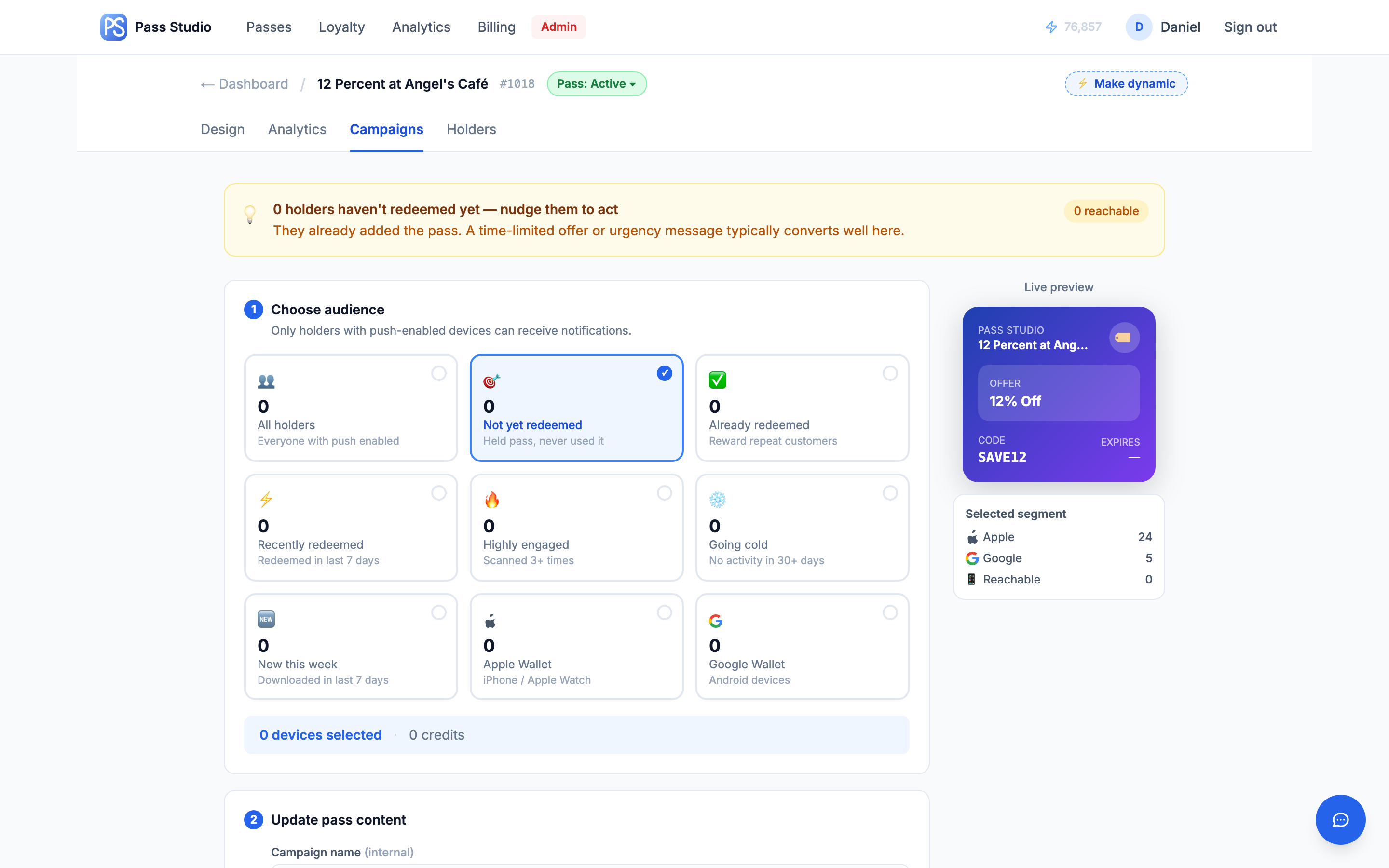
The Campaigns tab targets one of nine segments, each computed live with its reachable-device count:
- All holders
- Not yet redeemed — added the pass, never used it
- Already redeemed — at least one redemption
- Recently redeemed — redeemed within the last 7 days
- Highly engaged — 3+ scans or opens
- Going cold — no activity for 30+ days
- New this week — added within the last 7 days
- Apple Wallet users / Google Wallet users
A campaign is built in four steps: select the segment; write the message, one row per language of the pass; optionally update content on a coupon (offer title, promo code — with a random-code generator — expiry date, back-of-pass description) or add bonus points or an offer on a loyalty program's pass; then choose the start and the end, review the summary with audience size and credit cost, and send or schedule. Cost: 2 credits per notified device, on every plan, an offer included, charged at the start on the devices counted then. A scheduled campaign can be canceled until it starts. Campaign history records each campaign's status, segment, device count, credits, promo code, dates, and the change in redemption rate following each send. The same campaign can be sent over the API: POST /api/v1/passes/{passId}/campaigns.
Typical uses
- Not yet redeemed, 10 days after launch: reminder message plus a fresh expiry to re-open the window.
- Going cold: a win-back offer with a generated one-off promo code; the redemption delta in campaign history measures whether it worked.
- New this week: a low-key welcome explaining how to use the pass at the counter — silent, no alert.
Journeys
A journey is an ordered list of steps on a pass. Each step is a condition and a next pass. When something happens to a holder's card, the list of the pass the card sits on is read top to bottom; the first step whose condition holds moves the card to its next pass, in place — the holder keeps one wallet card whose content advances. No further steps are checked: the order is the priority. (Since 2026-10-26; the earlier pointer and its two rules read as steps, nothing changed for live journeys.)
The conditions
| Step | Holds when | Measured from |
|---|---|---|
redeemed | the card's last remaining use was spent on this step: a staff-app scan, POST /v1/redeem, or a paid order carrying the code. Never on a loyalty / membership face, where a scan is a visit. | arrival on this step |
order | the identified holder placed a paid order since arriving (Shopify, Square, Clover, POST /v1/orders/process), matched by order email. | arrival |
days | N whole days (1–365) have passed on this step, spent or not. | arrival |
asked | your API client or Zap called POST /v1/instances/action with journeyMoveToNext for this card, shown in the Studio as "On the API call: action (journeyMoveToNext)". | that call |
balance | the holder's spendable balance in the pass's points bank is at least N. | absolute |
levelReaches | the holder's status level in the bank is at or above the letter (A–E). | absolute |
levelBelow | the holder's status level is below the letter. | absolute |
Every pass of a workspace reads the workspace's points bank, so every pass of a journey sees the same balance and the same level. A condition measured since arrival cannot hold on a pass the card has just landed on, which is what lets a cascade settle.
When the list runs, and what is not a run
- A pass is issued to a holder (
issue): a holder who already has a balance or a level in the bank leaves a welcome step at once. - A staff-app scan or
POST /v1/redeemthat spends the card (scan). - A paid order from the identified holder (
order) — after the pass's program has deposited the points. - Any other points deposit (since 2026-11-06, also
order): an award from the Studio's Holders panel, the staff app,POST /v1/loyalty/points, Zapier or Shopify Flow, or a campaign's bonus points — after the bank has taken the points. A deposit is a transaction, whatever its origin. POST /v1/instances/actionjourneyMoveToNext(api).- The bank's period cutoff, for the holders whose level dropped (
tier). - The daily sweep, every active card on every pass with at least one step (
time): the safety net for a step that could not run (not enough credits that day) and the only mover fordayssteps.
A manual points award runs the list (since 2026-11-06). Before that date an award deposited into the bank and evaluated the program's own reward step only, and a level the award crossed moved the card at the next real event or at the daily sweep. Now every deposit runs the rows of the pass the card sits on, as a paid order does: a balance or level step the award crosses moves the card at once, and a reward step the award crosses unlocks the reward at once. A deduction runs nothing. A pending reward holds the card: while a program is on its reward face no list runs for that card; the order that redeems the reward is the event that runs it.
Program first, then the list
On every event, two things in this order: the current pass's program (the deposit or the withdrawal in the bank; a redeemed welcome offer returns the card to earning, a redeemed reward withdraws the points and returns it), then the list — against the bank state the program produced. The program's reward is a step of the list, shown as Reward · from the program, that you drag like any other; by default it is last. With levelReaches C → Gold above it, a holder whose order crosses both the Gold line and the reward line moves to Gold, and Gold's own reward step grants Gold's reward; with the reward step first, the reward is granted and held, the next order redeems it, and then the card moves up. Both are valid; the panel notes the second.
Cascade, credits and the loop guard
After a hop the landing pass's list is read in the same run, and so on until no step holds, a next pass is unavailable (draft, archived, missing: the card stays on the last reachable pass), or the reward step holds. The move then happens once, for the final pass only: one push credit per run that moves a card, however many steps it hops through; nothing is minted or pushed for passes passed through. Each hop still publishes its own journey_transition event with a shared runId, cascade on every hop after the first and final on the last. A step that points back to a pass the card already passed through in one run stops the run before that hop, leaves the card on the last new pass and notes it on the pass that owns the step; a run may return to its starting pass once (a reward coupon redeemed and earned again).
What a hop does to the card
- Fields: every personalized value travels — stamps, the holder's photo, member rows, any API-set field. Points and the level name are not carried: the next pass renders them from the bank and its own level names.
- Step state resets: redemption state, the arrival stamp, the pending cost of a reward coupon.
- The code is the next pass's: a pass with a program shows the program's current code for the holder; a unique-code coupon mints from its own numbering and creates the Shopify / Square code; a simple pass uses its template barcode; a loyalty / membership face without a program gets the card's original barcode back.
- Codes left behind are canceled: an unredeemed welcome offer is canceled the moment the card leaves the welcome face; the holder's codes in a program they leave are retired.
- Each move costs 1 push-update credit. A key restricted to passes must list every pass of the journey.
Levels as steps
Status levels live on the bank's ladder (A the base, B to E with thresholds); the names live on each card's Levels card. Rank level steps from the far end inward so each catches one level: on a Standard face levelReaches C → Gold, then levelReaches B → Silver; on a Gold face levelBelow B → Standard, then levelBelow C → Silver. A demotion at the period cutoff is a plain hop back; the lower face's program takes the holder from there. The Levels card's A pass per level button creates the faces and these steps for you, with the card's earning rules (welcome points stay with the base card). Since 2026-10-31 the faces follow the card's status: on a live card they are published at once, 10 credits each, checked before anything is created; on a draft card they stay drafts to recolor and go live with it. A face a member cannot reach because it is still a draft is a step the engine skips.
Rewards without a program
A program-less face rewards through a balance N → reward coupon step: the coupon costs N points at its redemption (withdrawn from the bank then, never before), and the card returns through the coupon's own redeemed step. A coupon that hops away unredeemed costs nothing.
Typical uses
- Acquisition chain: a welcome coupon turns into the member card on redemption, on the holder's first order, or when a Zap asks — whichever step is reached first.
- Status faces: Standard, Silver and Gold cards on one bank, each with its own program; level steps move holders up at the order that crosses the line and down at the period cutoff.
- Standing promotion: a self-loop reissues the same offer with a fresh one-time code after each redemption.
Modifying a journey
- Re-ordering or re-pointing steps affects future runs only; holders already moved stay where they are.
- A live pass whose step points at a draft publishes that draft when the steps are saved (since 2026-11-08; before that date the save was refused). In the Studio the option reads "draft — goes live when you save" and the panel names what went live; on the API the response carries a
warningsentry with codedraft_target_publishedand the pass id. Billing is the publish-as-a-unit rule: a member of a loop with a Loyalty or Membership head publishes free, a standalone draft bills its first publish, and when credits do not cover it the save fails withINSUFFICIENT_CREDITSand nothing changes. A draft may point at a draft; publishing it publishes every draft its steps reach, named before you confirm; a draft whose steps arrive into it, such as the welcome coupon in front of a loyalty card, is published on its own. Passes in a loop change status as a unit; a step into a pass that leaves the loop is dropped and named. A refused journey save returns 422 with a stablecodenext to the message:hop_target_missing,hop_when_invalid,hop_days_invalid,hop_points_invalid,hop_level_invalid,hop_self_target,target_missing_or_archived,target_other_account,target_pool_mode,reward_index_invalid,journey_too_many_hops. - Dashboard indicators: → journey badge, ↻ for self-loops.
Earning and rewards
Since 2026-10-27 a loyalty card earns by itself and a journey rewards: there is no program object for anything new. The card's Earning section (Template tab) holds the rules — points per paid order or per amount spent, welcome points, the points notification. The reward is an ordinary coupon pass reached by a balance reachesstep on the card, and that step carries the cost; the welcome offer is a coupon in front of the card with its own steps. Levels and periods belong to the workspace's points bank. Nothing is hidden: every face is a pass you design, and the journey panel shows the loop on each of them.
Setup: the Basic Three-Step-Journey
- Design a Loyalty / Membership card and switch Earning on in its Template tab: per visit (a fixed number of points per paid order) or per amount spent, welcome points (on a stamp-grid card, welcome stamps), the notification.
- Design the reward as a coupon pass with its discount. On the card, add the stepbalance reaches N → reward, with a cost when the redemption should withdraw more than the threshold (the strict reset: 5 stamps, cost 6). On the reward, add on redemption → card. With a Shopify store, switch Apply this reward automatically on the reward's panel.
- Optional: a welcome coupon in front with on redemption → card and balance reaches 1 → card, so a holder who already earns skips it.
- Publish from any of them: the loop publishes as a unit.
Runtime behavior
- Orders earn by identity — a paid order is matched to the holder by its email; every active card of theirs on an earning pass of the workspace earns, one deposit per order per points bank, and each card's steps run. An order that spends a coupon code still earns.
- Welcome points — granted once per member when the card is issued (or when a journey lands it on the card), before the steps run; they count toward levels and show on the card from the first open.
- The reward — the step hops the card onto the reward pass with a fresh code and a pending cost; the card is held there until the reward is redeemed; the redemption withdraws the cost, surplus carries over, and the reward's return step brings the card back. With the automatic reward on, the store's discount applies the code by itself once the customer is on the order.
Existing programs. A program set up before 2026-10-27 — the three-face loop on an offer pass, or the single-card program on a membership card — keeps running exactly as it did, with Edit program, pause and resume, its Square campaign and its automatic reward. No new program can be created in the Studio. Over the API and Zapier, POST /v1/loyalty/programs keeps its request shape for backward compatibility: it builds the three-step journey above as drafts and answers DEPRECATED: Create a Journey instead.
On Android the faces render as a single Google Wallet loyalty card updating in place (Google Wallet does not permit a saved pass to change card type); the front shows points and the current offer.
Counter awards via the POS staff app run through the same engine — thresholds, state transitions, and notifications behave identically to order-driven accrual. Orders from non-Shopify systems can feed the loop through Zapier or the REST API.
Typical uses
- Café: welcome drink discount → points per order → free item at the threshold, awarded either by online order or a counter scan.
- Online store: 10% welcome code → points on every paid order → fixed-amount reward; the whole cycle runs from order webhooks with no staff involvement.
- Hybrid retail: anonymous walk-ins collect points by barcode scan at the register and are merged into an identified profile the first time they order online.
Credit costs
- Save & push to all holders — 1 credit
- Campaign — 2 credits per notified device, on every plan, an offer included
- Journey transition — 1 credit per holder transitioned
- Geofence notifications — no credits (device-native)
- Creating or editing a loyalty program — free (since November 3, 2026; the dynamic upgrade was 10 credits before)
- Publishing a loyalty program — 10 credits once, at the card's first publish; its reward coupon, a welcome coupon and level faces publish free (since November 3, 2026). A journey without a loyalty card keeps 10 credits per pass at first publish.
Full rates and plan differences: Credits & Billing →